


Day Counter. Count Up & Down
4.1173.00 Reviews
App Specs
- Version
- 1.40.0
- Updated On
- License
- Free
- Downloads
- 100,000+
- Developer
- BITSENS
- Categories
- Events
- Platform
- Android, iOS
Screenshots
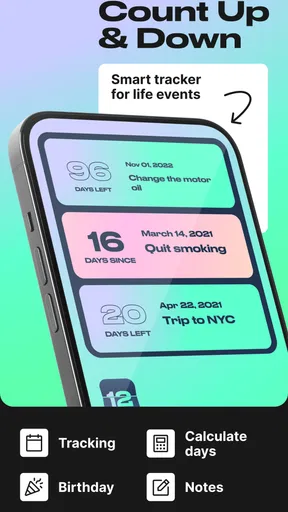
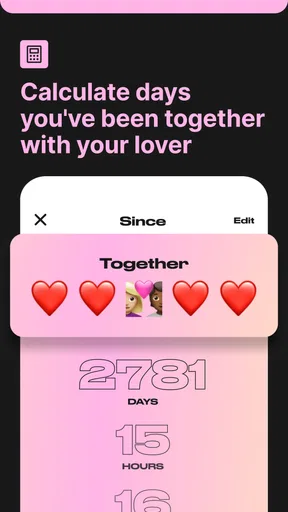
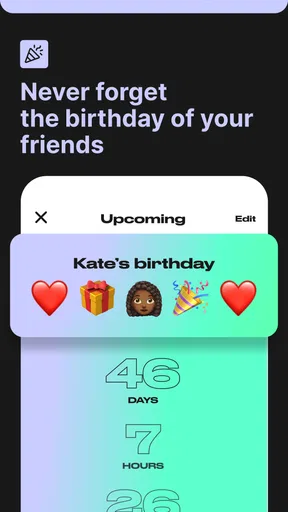
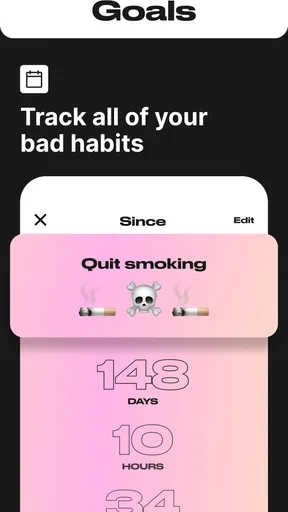
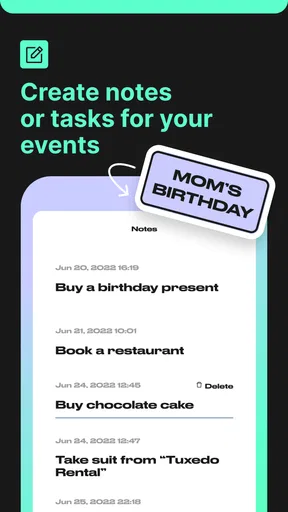
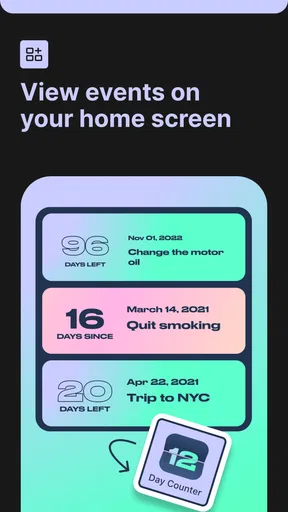
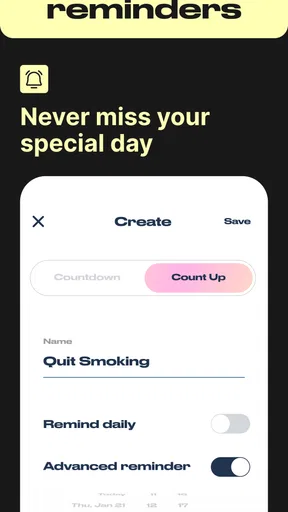
 Analysis by AppCompare
Some apps earn their place on a phone in a few minutes; the harder test is whether I still open them once the novelty wears off. A day counter has to make recurring moments easier to notice without turning every date into another task to maintain. My take on Day Counter. Count Up & Down is that it works best as a small, purposeful companion: useful when a date or milestone matters to you, but not a replacement for a calendar or a full habit tracker.
Why the first week feels useful
The appeal is immediate if you have a handful of dates you keep calculating in your head. A birthday, the start of a new routine, an upcoming trip, or a work deadline can each become a counter, so you can check how far away an event is or how long it has been since it began. The app is free to start, is rated for Everyone, and comes from BITSENS. Its Android release dates to April 11, 2020, and the current version is 1.38.0, with Android 7.0 or later required.
I’d begin with only the events that genuinely benefit from a visible day count. That small choice makes the first screen more useful: a countdown to a planned trip may prompt you to prepare, while an anniversary count-up can make a personal milestone feel tangible. If I add every appointment and minor deadline, the counters compete for attention and the app becomes a less convenient duplicate of my calendar.
What makes the idea stick month to month
The longer-term value depends on whether a counter changes what you do. For a birthday, seeing the date approach can remind me to arrange a gift before the last minute. For a habit, a count-up can mark the time since I started, but it is a record of elapsed days, not a system that teaches the habit or explains why I missed a day. That distinction matters: I’d use it to keep a milestone visible, and pair it with a proper habit app if I needed routines, check-ins, or progress analysis.
The store summary describes birthday, habit, and goal tracking alongside unlimited countdowns and count-ups. That breadth suits people who think in dates rather than project boards. The app has a 4.3 average from around a thousand ratings, and more than a hundred written reviews; those figures suggest a useful, established niche, not a guarantee that its approach will fit everyone. It has passed a hundred thousand installs, which is another sign that the simple day-counting idea has found an audience.
Keeping counters useful without creating chores
My practical rule would be to review the list whenever a major date passes. Remove or retire counters that no longer matter, and keep recurring events separate in your mind from one-off deadlines: the former are reminders of a continuing relationship or routine, while the latter usually belong in a calendar with more scheduling detail. This kind of light housekeeping helps preserve the app’s main advantage—a quick glance at meaningful time spans—without turning it into a second inbox.
There is a trade-off in choosing a focused counter over a broader planner. A countdown can make a distant event feel concrete, but it cannot by itself organize the steps leading up to it. If preparing for travel involves booking, packing, and paperwork, I’d use the counter as a nudge and put the actual tasks somewhere designed for lists. Similarly, a work team may want shared assignments and status updates rather than a collection of personal timers.
Worth Reading Before You Choose

EA SPORTS FC Mobile 26 Is a Bigger Football Game, but It Takes Time

Flipboard Shows What News Apps Must Do Beyond the Feed

Switching to Android Auto Means Rethinking Your Driving Routine

Google Calendar Makes a Crowded Week Easier to Manage

Ludo King Makes the Most of the Minutes Between Plans

Baby Panda World Brings Quick Play to Modern Phones, but Its Game Library Feels Busy
Where fatigue can set in
Seeing a number change each day can be motivating at first, but it can also become visual noise if too many counters stay active. Count-ups can be especially mixed: they may celebrate a streak or a meaningful date, yet a missed routine can make the number feel discouraging rather than helpful. I’d treat the count as context, not a score, and avoid making a single number the measure of whether a goal is going well.
There is also a natural limit to what this kind of app should handle. If you need detailed calendar coordination, collaborative planning, or a structured habit program, a dedicated alternative is likely a better fit. Day counting is strongest when the question is simply “how many days until?” or “how long has it been?” Keeping that boundary clear prevents disappointment and makes the app easier to return to.
First Impressions and User Interface
The first thing I noticed upon downloading Day Counter. Count Up & Down was its clean and intuitive interface. The app opens up with a straightforward dashboard that gives you a quick overview of your active counters. Setting up a new countdown or count-up timer is as simple as tapping the plus icon. You’re then prompted to enter a name, date, and choose whether you want to count up or down. It’s clear and to the point, which is exactly what you need in an app like this.
Features That Stand Out
One of my favorite features is the ability to add reminders. Let’s say you’re counting down to a vacation. You can set the app to remind you when you’re a week out, and then again a day before. This is super handy for planners like me who might forget to get their travel documents ready in time.
The app also allows for customization. You can choose different themes for each counter, which adds a personal touch. I found this particularly helpful for distinguishing between personal and professional deadlines. Plus, there’s something quite satisfying about seeing a colorful interface that reflects your mood or the significance of an event.
Performance and Reliability
So far, I haven’t encountered any bugs or crashes, which is always a relief. The app runs smoothly and updates counters in real-time. I’ve tested it with both daily and annual events, and it consistently stays accurate. The notifications are prompt, and the app doesn’t drain my battery, which is a huge plus for those of us who are always on our phones.
Integration and Compatibility
Another aspect where Day Counter. Count Up & Down shines is its integration capabilities. It syncs seamlessly with your calendar and can even share countdowns with friends or colleagues. I’ve used this feature to coordinate with team members on project deadlines, and it’s been a lifesaver. The app is available on both Android and iOS, making it accessible for almost everyone.
Room for Improvement
While the app is pretty solid overall, there are a couple of features I’d love to see added in future updates. For instance, a social sharing option would be great for those of us who like to share excitement about upcoming events on social media. Also, incorporating widgets for quick access on the home screen would make it even more user-friendly.
Despite these minor quibbles, Day Counter. Count Up & Down is a fantastic tool for anyone needing to track time effectively. Whether you’re eagerly awaiting a vacation, counting down the days to a big presentation, or simply keeping track of how long it’s been since you started a new habit, this app has got you covered.
Who is likely to keep using it?
I think this is most appealing to someone who likes a visual prompt but does not want to build a whole planning system. A person tracking a family birthday, a personal anniversary, and the start of a long-term goal can give each date a distinct purpose and glance at them together. It is less compelling for someone whose day is already organized around a calendar, since adding every meeting and deadline here would mean maintaining the same information in two places.
For a realistic routine, imagine checking the app on Sunday evening before a busy week. A countdown to a family event can show whether there is still time to plan, while a count-up can mark how long a new daily walk has been part of your life. I would then put the actual shopping, travel, or scheduling actions into a task list. The counter supplies perspective; the task list carries the practical work. Separating those roles is a useful way to get value without expecting a day number to manage everything.
Small decisions that improve the experience
One useful habit is to give each counter a name that will still make sense months later. A label such as “renewal date” is more actionable than a vague phrase, because it reminds me why the date matters when I see it again. I’d also avoid creating multiple counters for the same event just to represent different stages; if those stages require separate actions, reminders or a checklist are clearer than a crowded set of near-identical countdowns.
Reminders are most valuable when they are tied to a decision I need to make. For a trip, a week-ahead nudge can be a prompt to check preparations, while a day-before reminder may be too late for anything that requires booking or paperwork. I would choose reminder timing based on the action, not just the event date. That makes notifications feel deliberate rather than like another stream of alerts I eventually ignore.
Customization has a practical side as well as a decorative one. Since themes can distinguish counters, I’d use a consistent visual convention—for example, one look for personal milestones and another for work dates—rather than selecting themes randomly. It will not add planning features, but a clear visual pattern can make a busy counter list easier to scan. The trade-off is that personalization takes a little thought up front, so it is worth doing only if the list is large enough for quick recognition to matter.
How it compares with calendars and habit apps
Compared with a standard calendar, a day counter puts elapsed or remaining time in the foreground. That is a real difference: calendars are better for appointments, recurring schedules, and seeing what happens on a particular day, while a counter gives a date an ongoing presence between now and then. I would not move all my calendar entries into this app. I’d reserve it for dates I want to notice repeatedly, rather than events that only need a time slot.
Against a habit tracker, the distinction is just as important. A count-up can make continuity visible, but it does not replace logging individual sessions or reviewing patterns. If I wanted to understand whether I exercise consistently across a month, a tracker with check-ins would tell me more than a single elapsed-day figure. If I mainly wanted to remember when I began and see the time pass, the simpler counter would be less demanding.
Cost, fit, and the lasting-space test
The app is free, with in-app purchases ranging from $2.99 to $19.99 per item. I’d start with the free experience and decide whether its everyday role is clear before spending anything. The key question is not whether more customization or options sound appealing, but whether I’m actually returning to the counters I created. If the app becomes a place I check for a few meaningful dates, paying for extras may make sense to an individual user; if I stop opening it, an upgrade will not solve the underlying problem.
As an events app, it has a narrow job and that is both its strength and its boundary. BITSENS has kept the core idea centered on counting days, and the current Android version is 1.38.0. A narrow tool can remain useful for years if it answers a recurring question quickly, but it is not automatically a good home for every goal, deadline, or birthday. I would skip it if I need shared calendars, detailed planning, or a structured program that guides a habit from one day to the next.
So, if you’re looking for a reliable companion to help you manage your time, give Day Counter. Count Up & Down a try. It’s easy to use, visually appealing, and, most importantly, it works like a charm. Happy counting!
My long-term verdict
For me, the lasting value comes from restraint: choose a few dates that deserve a regular glance, give reminders a real purpose, and let other tools handle scheduling and detailed follow-through. That keeps the app from becoming a novelty dashboard or another list to clean up. If you enjoy seeing milestones made visible and want a low-effort way to keep birthdays, goals, and personal dates on your radar, it earns a modest place on your phone. If you want a complete organizer, I’d look elsewhere.
Pros
- Intuitive user interface design.
- Customizable countdown events.
- Syncs across multiple devices.
- Notifications for important dates.
- Lightweight and fast performance.
Cons
- Limited free version features.
- Ads can be intrusive at times.
- No integration with calendars.
- No dark mode available.
- Occasional bugs in notifications.
FAQs for Day Counter. Count Up & Down
What is Day Counter: Count Up & Down used for?
Day Counter: Count Up & Down is an app designed to help users track important dates. Whether you're counting down to a significant event like a wedding or counting up from a past milestone, the app provides a simple and effective way to manage and visualize your timelines.
Can I customize the events I track in Day Counter?
Yes, the app allows full customization of events. You can name each event, choose specific colors, and set reminders. This personalization helps users differentiate between multiple events and ensures you never miss an important date.
Does Day Counter send notifications for upcoming events?
Absolutely, Day Counter is equipped with a notification feature. You can set reminders for each event, and the app will notify you as the date approaches. This feature ensures you stay informed and prepared for every occasion.
Is there a limit to the number of events I can track?
Day Counter allows you to track an unlimited number of events. This flexibility is perfect for users who have numerous personal and professional dates to manage, ensuring you can keep all your important timelines in one place.
Does Day Counter support both Android and iOS devices?
Yes, Day Counter is available for download on both Android and iOS platforms. This cross-platform compatibility ensures that users can enjoy the app's features regardless of their device preference, making it accessible to a wide audience.


